


ClearSpeakers is a free speaker cleaner that plays a low-frequency tone through your phone speaker. The tone shakes trapped water and loose dust out of the speaker grille. It runs in your browser on iPhone, Android, tablets and laptops, with no app and no sign-up.
The tool clears water sitting near the speaker. It doesn't dry the inside of a phone or repair damage. The guide below shows how to use it, when it works, when it doesn't, and what to do next.

What Is a Speaker Cleaner?
A speaker cleaner is a tool that plays a low-frequency tone, usually 165 Hz, through a phone speaker so the vibrating diaphragm pushes trapped water and dust out of the speaker grille.
A speaker cleaner uses the speaker itself as the cleaning device. Nothing touches the phone, and nothing goes into the openings. Speaker cleaners come in three forms: browser tools like this one, phone apps, and built-in system features on some watches and phones.
The diaphragm is the thin membrane inside the speaker that moves back and forth to make sound. The speaker grille is the mesh of tiny holes over it. Water and lint settle in that mesh. A blocked grille makes calls, music and alarms sound quiet, muffled or crackly.
How Does a Speaker Cleaner Work?
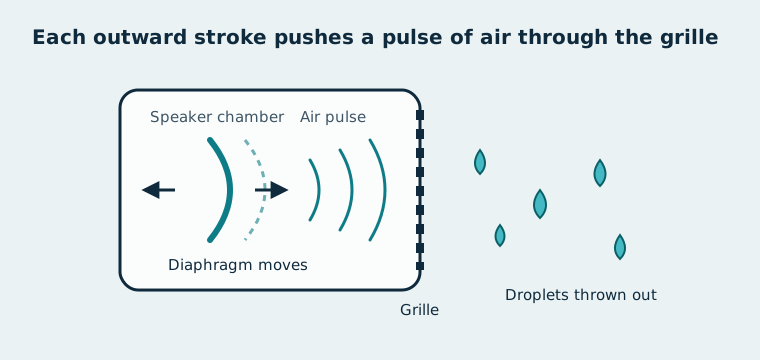
A speaker cleaner works by driving the speaker diaphragm hard at a low frequency, so each movement pushes air, and the water in its path, out through the grille.
The tone does the work in three stages:
- Vibration: the low tone moves the diaphragm farther with each cycle than normal music does.
- Air pressure: each outward stroke pushes a pulse of air through the speaker chamber.
- Ejection: the pulses break the surface tension holding droplets in the grille and throw them out. Gravity helps when the speaker faces down.
Apple uses the same method on the Apple Watch. On Series 2 and later models, the watch plays a series of tones to clear its speaker when you turn off Water Lock after swimming, according to Engadget. Slow-motion footage from The Slow Mo Guys shows droplets leaving the speaker holes as the tones play. The Apple Watch Water Lock feature is the clearest proof that sound can push water out of a small speaker.
Why Do Speaker Cleaners Use 165 Hz?
Speaker cleaners use 165 Hz because a low tone moves the diaphragm farther than a high one, and a phone speaker can still play 165 Hz loudly.
Phone speakers are small, so they struggle with deep bass. A tone that is too low barely plays. A tone that is too high makes the diaphragm move only a tiny distance. 165 Hz sits between the two, in the low-mid range.
165 Hz is the frequency most tools use. It isn't a published standard, and no manufacturer has named one ideal frequency. The Dust Clean mode on this page sweeps between about 120 Hz and 400 Hz to reach particles of different sizes.
How to Use the Speaker Cleaner
To use the speaker cleaner, turn the volume up, place the phone speaker-side down, and run 30–60 second cycles until the sound is clear.
-
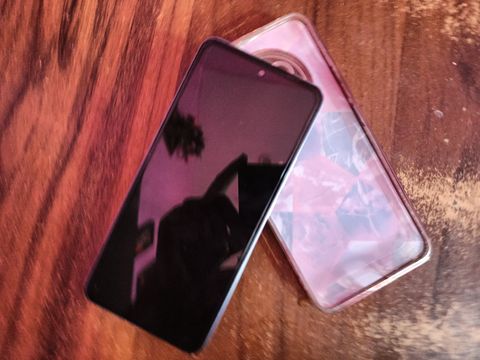
Remove the case. Cases trap water against the grille and block the air pulses.
-
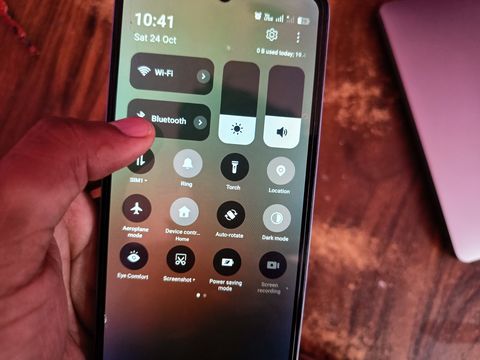
Disconnect Bluetooth and headphones. The tone has to play through the phone's own speaker, not a connected device.
-
Raise the media volume toward 100%. A quiet tone barely moves the diaphragm.

-
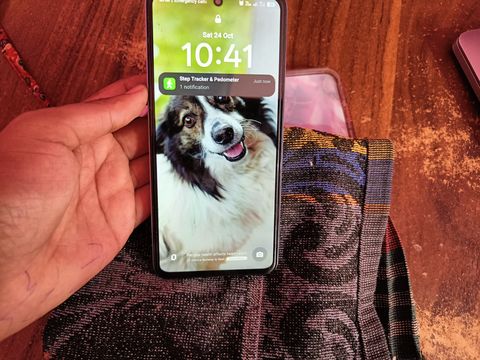
Place the phone speaker-side down on a dry towel. Tilting it lets gravity pull loosened water out.
-
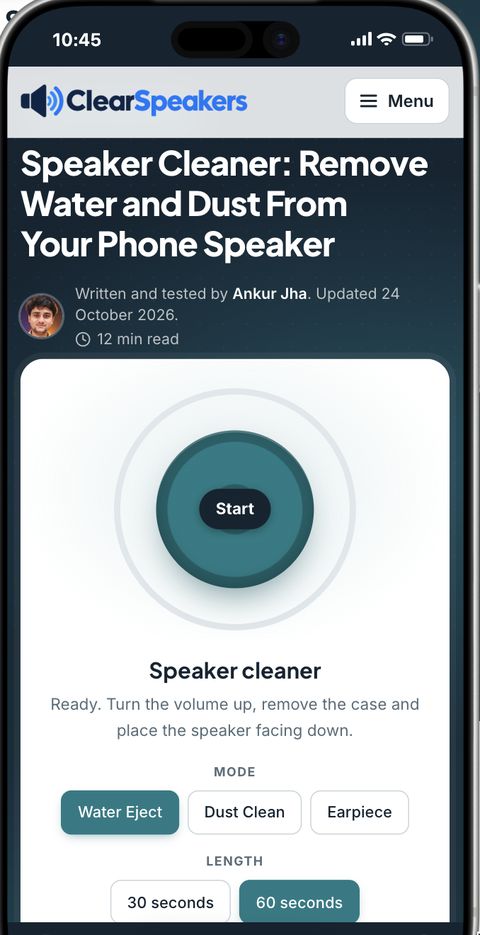
Press Start and let one cycle run for 30–60 seconds. You may see small droplets or feel the phone buzz.
-
Repeat for 2–3 cycles, then run the speaker test. Stop as soon as voice and music sound normal.
Three cycles is the limit for one session. If the sound is still muffled after three, the water is deeper than the grille, or the problem isn't water. Jump to what to do when your phone still sounds muffled.
Which Cleaning Mode Should You Choose?
Choose Water Eject after a splash, Dust Clean when the volume has dropped slowly, and Earpiece mode when callers sound muffled.
Each mode plays a different tone pattern for a different blockage.
| Mode | Use it when | Tone | Cycle length |
|---|---|---|---|
| Water Eject | The phone got splashed, rained on or dropped in fresh water | Pulsed 165 Hz | 30–60 seconds |
| Dust Clean | Volume dropped slowly over weeks; lint from pockets | Sweep, about 120–400 Hz | 30 seconds |
| Earpiece | Callers sound muffled; the top speaker is blocked | Gentler 165 Hz at a lower level | 30 seconds |
The earpiece is the small speaker at the top of the screen. It's smaller and more delicate than the bottom speaker, so it gets a softer tone. For a dedicated tool with earpiece-specific steps, use the earpiece cleaner. Hold the phone with the earpiece facing down while it runs.
Does a Speaker Cleaner Really Work?
Yes, a speaker cleaner works on small amounts of water and loose dust sitting in or near the speaker grille. The tone clears what the diaphragm can reach with air pulses. It can't reach water inside the phone body, and it doesn't dry anything by heat.
A speaker cleaner gives the best results within minutes of a splash, rain or a quick dip in fresh water. Results drop when the phone stayed underwater for a long time or the liquid was salty or sugary. In those cases, the tone may clear the grille while the real problem stays inside.
Samsung's support pages note that vibration from the speaker during a call can clear moisture left on the speaker mesh. A speaker cleaner speeds up that same effect with a louder, steadier tone.
What Can't a Speaker Cleaner Fix?
A speaker cleaner can't fix problems that aren't caused by water or dust in the grille. Six common problems need a different fix:
- Water in the charging port: the speaker tone doesn't reach the port. It needs air-drying; see water in the charging port.
- Salt or sugar residue: sound can move liquid but not dried residue. Saltwater needs a fresh-water rinse first.
- Corrosion: green or white buildup on metal parts is permanent damage that needs a repair shop.
- A torn diaphragm: a split membrane rattles or buzzes at every volume, wet or dry.
- Audio routed elsewhere: a connected Bluetooth device or a silent-mode setting can mute the speaker. Check these before cleaning.
- Air-pressure muffling: water-resistant phones can sound quiet after a flight or a dive. This needs pressure to equalize, not cleaning.
Is a Speaker Cleaner Safe for Your Phone?
Yes, a speaker cleaner is safe for your phone when you run it in short 30–60 second cycles. Phone makers set maximum volume within the speaker's safe operating limits, according to iFixit's answers community. Playing at maximum volume for long stretches can shorten a speaker's life, so the risk comes from running the tone for many minutes, not from one cycle.
Keep these limits:
- Run no more than 3 cycles in one session.
- Stop if the speaker crackles or buzzes louder with each cycle.
- Stop if the phone gets warm, shows a liquid warning on screen, or restarts.
A speaker that still crackles after the phone is fully dry may be damaged. Repeating the tone won't repair it.
The tone is loud at full volume. Keep the phone away from your ears while it plays, and keep pets out of the room.
How Often Should You Use a Speaker Cleaner?
It depends on what blocked the speaker. Use the Water Eject mode once after each splash, swim or rainy walk, then stop when the sound is clear. Use the Dust Clean mode only when you notice the volume or clarity dropping.
A speaker cleaner isn't a daily routine. A clean, dry speaker gains nothing from extra cycles. If you need it often for dust, the grille is collecting lint from a pocket or a case edge. Wipe the grille gently with a soft dry brush, and check whether the case lines up with the speaker holes.
Speaker Cleaner for iPhone, Android and Other Devices
This speaker cleaner works on any device that can play sound from a web browser, but only some devices have a cleaning feature built in.
| Device | Built-in option | Does this tool work? | Note |
|---|---|---|---|
| iPhone | None | Yes | iPhone has no native water-eject feature. The popular "Water Eject" shortcut is made by the community, not Apple. See the iPhone speaker cleaner guide |
| Android phones | Depends on the brand | Yes | Brand-by-brand options are in the Android speaker cleaner guide |
| Samsung Galaxy | No cleaning tone; speaker diagnostics in the Samsung Members app | Yes | Run the tool, then check the result. See the Samsung speaker cleaner guide |
| Xiaomi, Redmi, POCO | Clear speaker in Settings › Additional settings | Yes | The built-in tone plays for about 30 seconds. See Xiaomi Clear speaker |
| Apple Watch (Series 2 and later) | Water Lock ejects water with tones when you turn it off | Not needed | Use Water Lock instead of this tool |
| Earbuds, AirPods, Bluetooth speakers | Usually none | Yes, when connected | Connect the device, then press Start. Keep earbuds out of your ears. See water in AirPods |
On a phone, play the tool in the phone's own browser so the tone comes out of the wet speaker. To clean a Bluetooth speaker or earbuds, connect them first so the tone plays through them.
Menu names on Android vary by brand and software version. If you can't find a built-in option, the browser tool works the same way.
What Should You Do If Your Phone Still Sounds Muffled After Cleaning?
If your phone still sounds muffled after 3 cycles, the water is deeper than the grille or the problem isn't water. Stop the tone, dry the phone properly, and rule out the other causes below.
How Do You Dry a Wet Phone Safely?
To dry a wet phone safely, drain it, leave it in moving air, and wait before charging. Apple Support gives these steps for a wet iPhone, and they suit most phones:
- Unplug every cable and accessory.
- Tap the phone gently against your hand with the charging port facing down to drain excess liquid.
- Leave the phone in a dry place with some airflow.
- Wait at least 30 minutes before you try charging. If the phone still warns about liquid, leave it to dry for up to 24 hours.
For a full walkthrough, see how to dry a wet phone.
Should You Put a Wet Phone in Rice?
No, you shouldn't put a wet phone in rice. Apple warns that small rice particles can get into the phone and damage it. Apple advises against drying an iPhone with a heat source, such as a hair dryer, or with compressed air.
Can You Charge a Phone When Liquid Is Detected?
No, you shouldn't charge a phone with a wired cable while liquid is detected in the port. Apple says charging a wet connector can corrode the pins on the port or cable and cause permanent damage. iPhone XS, XS Max, XR and later models show an alert when they detect liquid in the port.
Apple allows two exceptions. In an emergency, you can reconnect the cable and override the alert. A wireless charger is safe to use once the back of the phone is dry. For the full fix, read about the liquid detected alert.
What Should You Do After Saltwater Exposure?
After saltwater exposure, rinse the phone with fresh water and dry it with a clean, soft cloth. Samsung warns that salt left to dry can build up and block the speaker, microphone and earpiece. Run the speaker cleaner only after the rinse and drying. More on a phone dropped in saltwater.
Why Does Your Speaker Sound Muffled After a Flight or a Dive?
Your speaker sounds muffled after a flight or a dive because the air pressure inside a water-resistant phone hasn't matched the outside air yet. Samsung says Galaxy speakers can sound quiet, crackly or distorted after a large pressure change. The pressure usually equalizes on its own. To speed it up, Samsung suggests sliding the SIM tray halfway out for a moment, then closing it.
How Do You Clean Dust From a Phone Speaker Grille by Hand?
To clean dust from a phone speaker grille by hand, brush it gently with a soft, dry brush while the phone is off.
- Power off the phone and remove the case.
- Brush across the grille with a soft, dry, clean brush, such as a new toothbrush.
- Tilt the phone grille-down while brushing so loosened dust falls out.
- Run the Dust Clean mode for one cycle to shake out what's left.
Don't push pins, toothpicks or cotton buds into the holes. Samsung advises against compressed air, which can damage the speaker. For more detail, see how to clean a phone speaker grille.
When Should You Take Your Phone for Repair?
Take your phone for repair when the speaker stays faulty after the phone is fully dry. Watch for these signs:
- No sound at all from the speaker, at any volume.
- Crackling or buzzing that continues after 24 hours of drying.
- A liquid warning every time you plug in a dry cable.
- The phone stayed underwater for a long time, or in salty, sugary or soapy liquid.
- The phone restarts, heats up or loses battery fast after getting wet.
Check the warranty first. Liquid damage is often excluded, even on water-resistant phones. For other causes, see phone speaker not working.
Speaker Cleaner FAQs
Does a speaker cleaner work on the earpiece?
Yes, a speaker cleaner works on the earpiece when you use the gentler Earpiece mode with the earpiece facing down. Some phones play browser audio only through the bottom speaker. On those phones, make a normal call with the earpiece facing down; Samsung notes that speaker vibration during a call can clear moisture from the mesh.
Does a speaker cleaner work with the case on?
No, a speaker cleaner works poorly with the case on, because the case traps water against the grille. Take the case off before every cycle.
Does a speaker cleaner work on laptops and Bluetooth speakers?
Yes, a speaker cleaner works on laptops and Bluetooth speakers, because the tone plays through whatever speaker your device is using. Connect the speaker first, then turn its volume up.
Do 165 Hz videos on YouTube work the same way?
Yes, a 165 Hz video works the same way if the tone is clean and you play it at full volume. Video compression and ads can interrupt the tone, so a dedicated tool gives you steadier cycles and a timer.
Is the Water Eject shortcut made by Apple?
No, the Water Eject shortcut isn't made by Apple. It's a community-made shortcut, and iPhone has no native water-eject feature.
Can the speaker cleaner sound damage my hearing?
Yes, the speaker cleaner sound can harm your hearing if you hold the phone against your ear at full volume. Keep the phone at arm's length or face down on a table while the tone plays.