


What Should You Do Right After Your Phone Gets Wet?
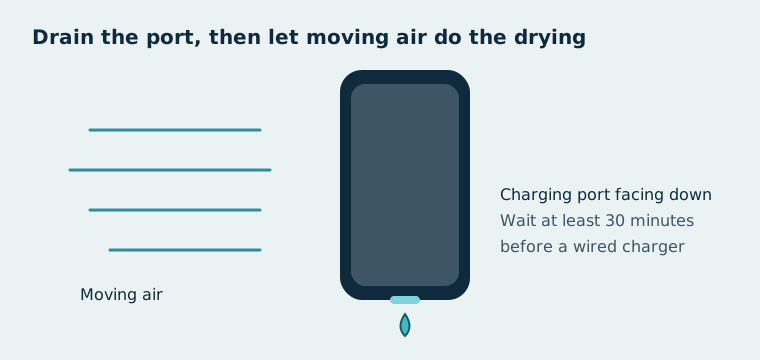
Right after your phone gets wet, take it out of the water, unplug everything, and drain the ports with the charging port facing down.
- Get the phone out of the water.
- Unplug every cable and accessory.
- Remove the case so water can escape.
- Pat dry the earpiece, microphones, speaker and charging port with a clean, soft cloth, as Samsung advises.
- Tap the phone gently against your hand with the charging port facing down, as Apple advises, then leave it somewhere dry with airflow.
How Long Does a Wet Phone Take to Dry?
It depends on how much water got in. Apple says to wait at least 30 minutes before you try a wired charger. If the phone still warns about liquid, leave it in a dry place with airflow for up to 24 hours. You can try charging again at any point during that time.
A phone that was splashed can be dry within an hour. A phone that went under water may need the full day.
What Should You Avoid When Drying a Phone?
Avoid rice, heat, compressed air and anything pushed into the ports.
- Rice: Apple warns that small rice particles can damage an iPhone. Read why on wet phone in rice.
- Heat sources: Apple advises against drying an iPhone with a hair dryer or other external heat.
- Compressed air: both Apple and Samsung advise against it. It can push water deeper and damage parts.
- Cotton buds or paper in ports: Apple advises against inserting foreign objects, such as a cotton bud or a paper towel, into the connector.
Should You Turn Off a Wet Phone?
It depends on whether the phone is still working normally. Turning a wet phone off reduces the chance of a short circuit while water sits inside. Don't switch it on and off repeatedly to test it. If it shut down by itself, leave it off until it has dried.
How Do You Get Water Out of the Speaker?
You get water out of the speaker by playing a low 165 Hz tone with the speaker facing down. Use the ClearSpeakers speaker cleaner once the outside of the phone is dry. It clears the speaker grille but doesn't dry the inside of the phone.
What If the Liquid Wasn't Fresh Water?
If the liquid wasn't fresh water, the residue it leaves behind is the bigger risk.
- Saltwater: Samsung advises rinsing the phone with fresh water, then drying it, so salt doesn't dry in the openings. See what to do with a phone dropped in saltwater.
- Pool water: wipe the phone with a cloth dampened in fresh water, then dry it.
- Sugary or soapy drinks: wipe the outside, dry it, and have the phone checked if buttons feel sticky or the sound stays muffled.
How Do You Know If Water Damaged Your Phone?
You know water damaged your phone when problems continue after it has dried for 24 hours.
- No sound, or crackling sound, from the speaker.
- A liquid alert that appears with every dry cable; see water in the charging port.
- Fog or droplets inside the camera lens.
- Random restarts or a screen that flickers.
- A battery that drains much faster than before.
A water-resistance rating lowers the risk but doesn't remove it; see what IP68 vs IP67 really covers.
When Should You Take a Wet Phone for Repair?
Take a wet phone for repair when any of the signs above last beyond 24 hours, or when it was underwater for a long time. Liquid damage is often excluded from standard warranties, so check your coverage first. If the only problem left is the speaker, work through the fixes for a phone speaker not working.
Speaker cleaner
Free speaker cleaner that plays a 165 Hz tone to push water and dust out of iPhone and Android speakers.